
Pocketmags Magazine Newsstand
Pocketmags.comNews & Magazines
4.5319.00 Reviews
- Version
- 7.12.4
- Installs
- 100.00K
- Age Rating
- Teen
Screenshots

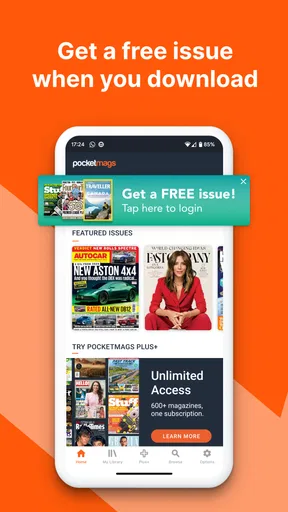
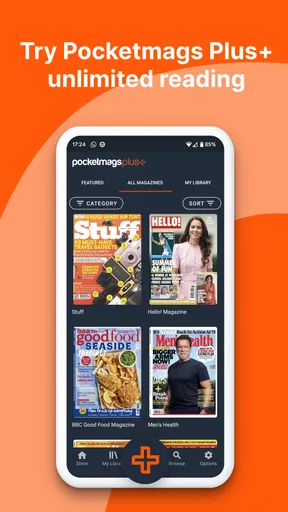

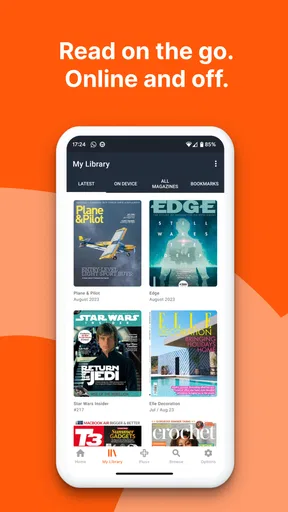
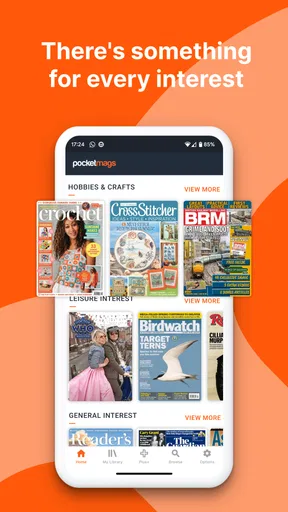

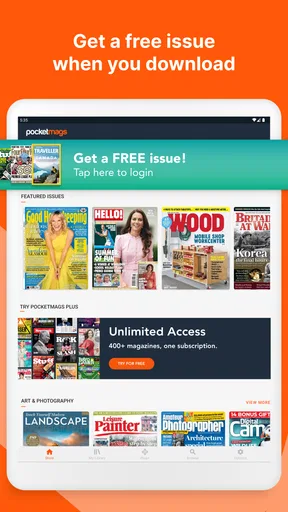
Our Review of Pocketmags Magazine Newsstand
 Analysis by Appyee
I tend to judge a digital magazine stand by a practical question: does it make it easier to find and enjoy a publication I actually want to read, or does it just add another place to browse? Pocketmags Magazine Newsstand is built around the first idea. It brings magazine titles together in one app, so I can explore different subjects without keeping a stack of print issues or hopping between separate publisher apps.
What the current app is best at
Made by Pocketmags.com, this free News & Magazines app has a 4.5 average from around 2.8 thousand ratings, with over 100 thousand installs. It is rated Teen, and its current version is 7.11.0. Those figures suggest an established service, but the useful question for a new reader is whether its magazine-led approach suits the way they read.
It suits people who already enjoy complete magazine issues and want a single place to browse across subjects. A magazine stand feels different from a news-feed app: instead of a constant stream of short updates, you choose a publication and settle into its issue. That slower, more deliberate rhythm is a real strength when you want something to read on a commute, during a break, or at home without scrolling through unrelated headlines.
The app is free to install, while in-app purchases range from $0.99 to $349.99 per item. I would treat the free download as a way to explore the experience, not as a promise that every magazine or issue is included at no cost. Before buying, I’d check the exact title and purchase terms shown in the app. That small pause matters if you are comparing a one-off issue with a recurring subscription or considering a larger bundle.
A World of Magazines at Your Fingertips
Imagine having a collection of thousands of magazines right in your pocket. Pretty cool, right? That’s exactly what Pocketmags Magazine Newsstand offers. From fashion and tech to travel and cooking, there’s something for everyone. The app is super easy to navigate, and you can find just about any publication you can think of.
One of the things I found really impressive is the variety. Whether you’re into mainstream titles or niche publications, you’ll find it all here. And the best part? You can access all your favorites anytime, anywhere. This is perfect for those long commutes or lazy Sunday mornings when you just want to chill with a good read.
Slick Design and User-Friendly Interface
The design of the app is sleek and modern, which makes browsing through the vast array of magazines a breeze. The interface is intuitive, so even if you’re not the most tech-savvy person (like me), you’ll find yourself navigating through the app with ease. You can search for specific titles or explore categories if you’re in the mood to discover something new.
Once you find a magazine you like, downloading it is quick and painless. You can either keep it on your device for offline reading or stream it directly if you’re connected to Wi-Fi. It’s super convenient and ensures you’re never without something interesting to read.
Making a magazine habit work in everyday life
For a realistic routine, I’d use the app in two stages. When I have a reliable connection, I’d look through the catalogue and download an issue I’m genuinely likely to finish; later, on a train or in a waiting room, I can read without depending on a signal. This works better than downloading several large issues just because they look interesting, especially if storage is tight or I tend to abandon things halfway through.
There is also a useful choice between browsing by publication and browsing by mood. Searching for a familiar title is the fastest route when I know what I want. Exploring categories is better when I have time and want to stumble on a subject I would not normally seek out. I would keep those activities separate: a quick search before a commute is practical, while discovery browsing is more enjoyable when I am not watching the clock.
Compared with reading news websites or general news apps, Pocketmags is more about whole issues and magazine-style presentation than breaking updates. Compared with buying print copies, it avoids carrying paper and lets a reader keep digital issues on a device. But if your priority is a free, continuously refreshed stream of headlines, a conventional news app is likely the better fit. If you mainly want one publisher’s articles, that publisher’s own app may also be simpler.
Features That Make It Stand Out
What really sets Pocketmags Magazine Newsstand apart from other similar apps are its standout features. For starters, the app offers a customizable reading experience. You can adjust the text size, background color, and even switch to a night mode for easier reading in low light. It’s these little touches that make a big difference.
Another cool feature is the ability to bookmark articles. If you come across an article you want to revisit later, just bookmark it, and it’s saved for future reference. This is perfect for those in-depth reads you want to ponder over or refer back to later.
The app also offers a great way to keep your collection organized. You can create your own library with all your favorite magazines and issues neatly sorted. This personalized library makes it super easy to access your go-to reads without having to sift through the entire catalog.
Small habits that make reading easier
I would use bookmarks as a light reading queue rather than a substitute for taking notes. Saving an article makes it easier to return to it, but a bookmark is not the same as a summary or a searchable research archive. For someone collecting recipes, travel ideas, or features to discuss later, it helps to make a habit of opening saved pieces again instead of letting the list become another pile of unread material.
Text and background adjustments are particularly useful when the setting changes. I might choose a larger text size for a short reading break or a darker screen for winding down at night, then switch back when I want to see a page’s layout more clearly. The trade-off is that a magazine is designed as a visual page, so a simplified reading preference may not suit every article equally well. For photo-led features, I would keep the page presentation in mind; for longer text, a more comfortable reading setup may matter more.
Before relying on an issue away from home, I’d open the download while connected and make sure the content I want is ready on the device. That is a simple way to avoid discovering at the station that I planned to read something I had not prepared. I’d also remove finished downloads when I no longer need them if device space is becoming an issue, rather than treating a digital library as unlimited local storage.
Subscription Options and Pricing
Now, let’s talk subscriptions. The app offers various subscription plans to suit different needs and budgets. You can choose to subscribe to individual magazines or opt for an all-access pass, which gives you unlimited access to the entire catalog. There are also often deals and discounts, so keep an eye out for those to snag a bargain.
The pricing is pretty reasonable, especially considering the sheer number of magazines you get access to. Plus, there’s a free trial period, so you can test the waters before committing. This is a great way to see if the app fits your reading habits without any upfront cost.
Choosing carefully before spending
I would compare the cost of the specific title I read most often with the way I actually use it, rather than assuming a broad-access option is automatically better value. Someone who finishes one regular magazine may be better served by buying that publication alone; someone who likes sampling several titles may prefer a broader arrangement if the terms make sense for them. The purchase range is wide, so checking the renewal details and what is included before confirming is a sensible part of the process.
A practical test is to browse first, identify a couple of titles I would genuinely read, and then decide whether a purchase makes sense. That prevents the catalogue’s breadth from turning into impulse spending. I would also distinguish between liking a magazine’s cover or subject and having time for its full issue: a single issue can be a better trial of my own reading habits than committing to a longer plan immediately.
For people asking whether they can read without a connection, the app’s download option makes that a sensible use case: prepare an issue while online and read it later offline. For people asking whether it is suitable for a casual reader, it can be, provided they are comfortable choosing individual titles and understanding which items cost extra. It is less compelling for someone who wants every article to be free, or who prefers bite-sized updates over full magazine issues.
Where it may not be the right fit
The biggest limitation is inherent in the format: a large catalogue is only valuable if it contains the publications you care about and the available purchase option suits your budget. I would not install it expecting a universal library of every magazine, nor assume that a free app means free access to everything inside. Availability and the value of a subscription are best judged title by title.
It may also be more app than a very occasional reader needs. If I only want a single article now and then, searching the open web can be quicker. If I follow one publication closely, reading directly from that publisher may feel more focused. Pocketmags is most useful in the middle ground: I want the experience of browsing and reading magazines, but I do not want to manage a separate app for every title.
What its version history means for readers
The app first appeared on September 28, 2011, and its current release is 7.11.0. That long presence gives me confidence that the digital magazine format is not a passing experiment, while the version number tells me the product has continued through multiple iterations. It does not, by itself, tell me which features changed or how a particular update affects my device, so I would judge the current experience by what I can actually use rather than guessing at a changelog.
For an existing reader, the practical question is whether the current app still makes their regular routine easy: finding a title, opening an issue, keeping a personal library, and returning to saved articles. If those basics remain comfortable, a version number alone is not a reason to change habits. A new reader, meanwhile, can start with a focused test: search for a familiar publication, inspect its available issues and purchase choices, and try the reading controls before building a larger collection.
My Final Thoughts
All in all, I’m thoroughly impressed with Pocketmags Magazine Newsstand. It’s a solid app that offers a convenient and enjoyable way to access a vast library of magazines. Whether you’re a casual reader or a hardcore magazine enthusiast, this app has something to offer.
If you haven’t checked it out yet, I highly recommend giving it a try. It’s perfect for those who want to stay updated with their favorite publications without the hassle of physical copies. So go ahead, download it, and dive into the world of digital magazines. Happy reading!
What I would watch before making it a regular read
For me, the strongest reason to keep using it would be a repeatable habit: a title I look forward to, a convenient time to read, and enough space on my device to keep the next issue ready. I would watch whether browsing continues to feel like discovery rather than work, and whether my actual reading justifies any paid option I choose. Those are more useful measures than simply collecting issues.
My recommendation is therefore specific. I’d suggest it to a friend who enjoys magazine layouts, likes exploring more than one subject, and values having offline reading prepared for spare moments. I’d steer a friend toward a regular news feed, a publisher’s own app, or print instead if those better match their reading style. For the right reader, Pocketmags offers a convenient way to make magazine reading fit into ordinary days; the best experience comes from choosing titles deliberately and treating purchases with the same care as the rest of a digital subscription.
Verdict
Strengths of Pocketmags Magazine Newsstand
- Wide variety of magazines available.
- High-quality, crisp digital formats.
- Offline reading mode available.
- Easy navigation and search features.
- Customizable reading preferences.
Limitations of Pocketmags Magazine Newsstand
- Requires subscription for most content.
- Occasional app crashes reported.
- Limited free content options.
- Ads can be intrusive at times.
- Download speeds can be slow.
Other Releases by Pocketmags.com
View All
Performance VW Magazine
Auto & Vehicles3.0
Similar Picks in This Category
View All
Google News - Daily Headlines
Google LLC4.0

X
X Corp.4.8

Flipboard:Your Social Magazine
Flipboard3.4

Opera News: breaking & local
Opera4.5

Hindi News by Dainik Bhaskar
Dainik Bhaskar Group4.0

Way2News Daily News App
Way2News ( Formerly Way2SMS )4.6
Frequently Asked Questions
What is Pocketmags Magazine Newsstand?
Pocketmags Magazine Newsstand is a digital platform that allows users to browse, purchase, and read a wide variety of magazines across different genres. It offers both single issues and subscriptions, providing a convenient way for users to access their favorite publications on mobile devices.
Is Pocketmags Magazine Newsstand available on both iOS and Android?
Yes, Pocketmags Magazine Newsstand is available for download on both iOS and Android devices. Users can find the app on the Apple App Store or Google Play Store, making it accessible for a wide range of smartphone and tablet users.
Can I read magazines offline with Pocketmags?
Yes, Pocketmags allows users to download magazines for offline reading. Once a magazine is downloaded, it can be accessed without an internet connection, providing the flexibility to read anytime, anywhere, without worrying about data usage.
What types of magazines are available on Pocketmags?
Pocketmags offers a diverse selection of magazines, including categories like lifestyle, sports, technology, fashion, and more. With thousands of titles available, users are likely to find magazines that cater to their interests and hobbies.
How does the subscription model work on Pocketmags?
Pocketmags offers both single issue purchases and subscription models. Subscriptions can be managed through the app, allowing users to receive new issues automatically. Users can choose subscription durations and often benefit from discounts compared to purchasing single issues.
